View
View: main class for View System operations - drawing and event handling
- Subclasses: Button, EditText, MapView, LinearLayout, AdapterView - adapter manages and provides data to the view
- View parameters: (relative) positioning/sizing and behaviour for different screen sizes (dp … density-independent pixels, wrap_content/match_parent, …)
- Event listeners for gestures (
onClick/onLongClick/onTouch/…)
Instantiated by Activities/Fragments through: XML in resources / Kotlin/Java source / Jetpack Compose
Display organised in a tree - root View containing all others (ViewGroup / LinearLayout / RelativeLayout / …)
Toolbar (ActionBar deprecated): quick operation navigation (title, logo, navigation, action menu, …)
Menus: allow adding items and handling onClick:
- Options menu: primary actions menu
- Context menu: options affecting selected item
- Popup menu
Material design: Library / system of guidelines and components
Fragment
Dynamic, flexible and reusable designs: has own Layout, multiple fragments can be on same screen
Fragment Lifecycle is attached to the underlying parent Activity lifecycle:
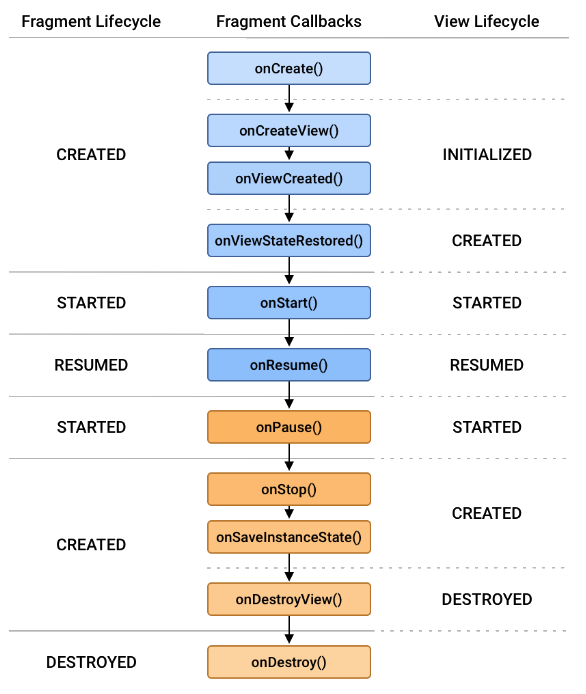
All Fragments of common Context (Activity) can store and pass information through it
Activity can access Fragments via FragmentManager, communicates to them by:
- Listeners: activity implements the interface Fragment defines
- Shared ViewModels (Jetpack Compose)
Navigation and view binding
Move towards single-activity/multiple-Fragment apps:
- navigation graph
- navigation host fragment
- navigation controller
Avoid findViewById calls (translation of id to object on screen - with R resources)
View bindings: binding class generated from XML layout