Application: collection of components that can be instantiated and ran
Activity
Activity implements a single focused task a user can do
Navigation: activity launching via Intents / using buttons or gestures
Activity lifecycle
Activity states:
- active/running: visible and interactible
- paused: lost focus but still visible, maintains state and member information
- stopped: obscured by another activity, retains state and member information but can be terminated by OS
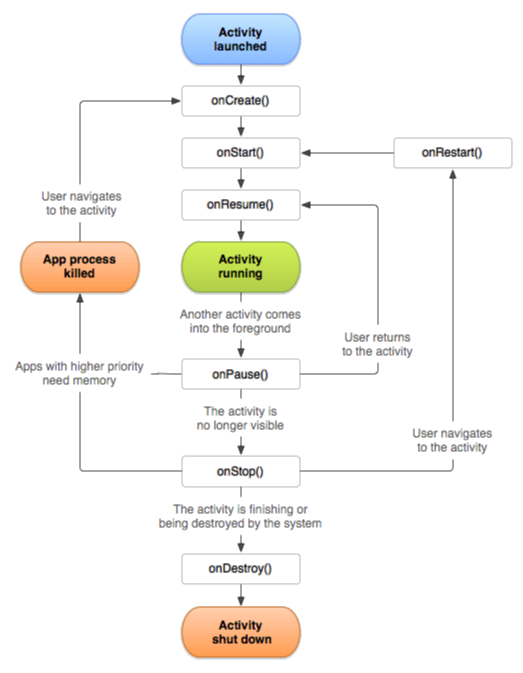
- Activity exists:
onCreate()onDestroy() - Activity visible:
onStart()onStop() - Activity visible in the foreground:
onResume()onPause()
onCreate(): Activity is first created initial state setup in super.onCreate(), passed Bundle contains Activity’s previous state
onStart(): Activity is becoming visible setup visible-only behaviour, load persistent application state, …
onRestart(): Activity is becoming visible after being stopped special processing
onResume(): Activity is visible and becoming interactable foreground-only activities
onPause(): Activity loses focus - another Activity is about to start fast commit of unsaved changes (or new Thread)
onStop(): Activity is no longer visible but still exists release not-needed resources
onDestroy(): Activity is being destroyed (called by finish() in app / back button is pressed), isn’t called when OS kills the application
Saving Activity state
Not a part of the lifecycle
Bundle stores: Acivity’s view hierarchy state + custom key-value data
onSaveInstanceState()/onRestoreInstanceState() and onCreate()
Starting activities
Create an Intent specifying the activity to start, pass to either startActivity() or startActivityForResult (expects result set by called Activity)
Task
Task: collection of Activities (not necessary from some application) user interacts with
Manages the Activity backstack: stack in order of being opened
- more instances of same Activity can be on it (Intent options)
- HOME pressed current activity stopped, task goes into the background
Intent
Intent: operation to be performed - request from one component, received by Activity that can fulfill it
Intent fields:
- Action: string representing desired operation (eg.
ACTION_DIAL, …) - Data: data in URI format the Intent operates on
- Category: additional info about component that can handle Intent (eg.
CATEGORY_BROWSABLE, …) - Type: MIME type of Intent data, otherwise Android tries to infer it (eg.
image/*,text/html, …) - Component: explicit name of a component class for Intent use, if specified other fields are optional
- Extras: additional information for Intent as name-value pairs (eg.
EXTRA_EMAIL, …)
Intent Resolutions: if Component is not specified Android uses IntentFilters of installed apps (ties resolved by user choice)
Flags
Flag: Intent handling specification (eg. backstack behaviour with FLAG_ACTIVITY_NEW_TASK, …)