Lifecycle awareness
Activity lifecycle aware components from androidx.lifecycle package
- LifecycleObserver notifies when LifecycleOwner moves through lifecycle stages
MVC drawback: Controller and View are tightly connected
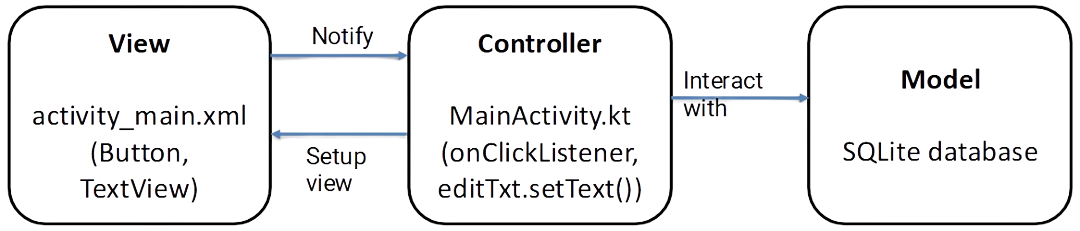
MVVM key points: ViewModel wraps the model with observable data View binds to
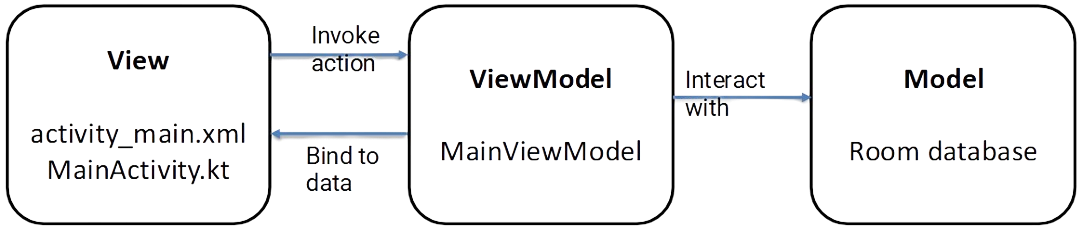
ViewModel class
Problem: data handled in Activities/Fragments prone to loss and memory leaks (when component gets destroyed)
Solution: ViewModel survives Activity/Fragment lifecycle changes provides data to view using it (without knowing about them), but is still scoped to ViewModelProvider’s lifecycle (eg. surviving Activity configuration changes, but not Activity destroy event)
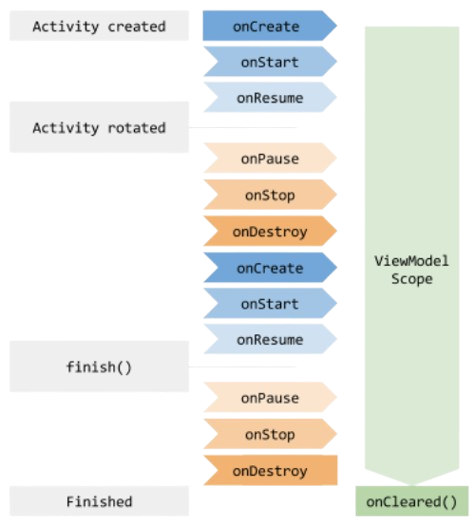
Problem: Views must query the ViewModel to detect any changes in the data
LiveData class
Problem: Views must constantly check updates for frequently updated data
LiveData:
- holds observable data (sends notifications to observers on change)
- lifecycle-aware (no updates if observer is paused)
Problem: View still must manually set and get changed data to update itself
Data binding
Mapping data of ViewModel to specific Views in the XML layout file: in <layout> root node add data variables
Binding types:
- one-way: View is updated with bound data, but it cannot change data (eg.
android.text="@{myViewModel.result}") - two-way: data can be updated in both ways (eg.
android.text="@={myViewModel.result}") - event and listener binding (eg.
android.onClick="@{()->myViewModel.method()}")
Kotlin flows
Sequential task processing (eg. filtering, mapping, combining, …) of data streams (LiveData with ability of complex processing of real-time data)

Object-Relational Mapping (ORM) and Room DB
Problems with data coming from databases:
- object oriented languages manipulate complex objects
- relational databases store and manipulate simple scalar values
converting objects to table entries is prone to errors
Room Database: Android SQLite database wrapper as interface between database and Java objects
Data movement:
- repository obtains Room DB instance and DAO (Data Access Object) instances
- repository creates entity instances passes them to DAO
- repository calls methods on DAO - passing entities for insertions / receives entity objects on queries / …
- DAO interacts with Room DB to handle database operations
- Room DB handles all low-level interactions with underlying SQLite database
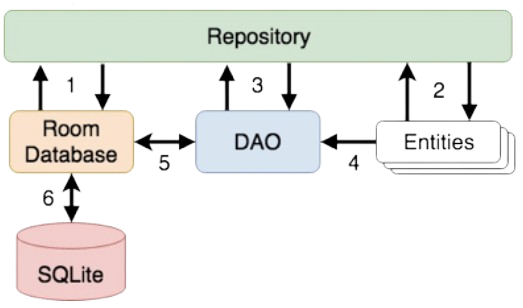
Database should not be accessed from the main thread - DAOs accessed by coroutines
Repository should handle Database instantiation
Entities
Entity classes serve as schema definitions of DB tables by using annotations
@Entity(tableName="customers")
class Customer {
    @PrimaryKey(autoGenerate="true")
    @NonNull
    @ColumnInfo(name="customerId")
    var id: Int = 0

    @ColumnInfo(name="customerName")
    var name: String? = null
}
DAOs
DAOs provide access to data stored in database
@Dao
interface CustomerDao {
    @Query("SELECT * FROM customers")
    fun getAllCustomers(): LiveData<List<Customer>>
}
Database instance
Helper class (extending RoomDatabase) for accessing SQLite DB